When n8n shows “this node threw an error during execution - check its inputs or try a different configuration,” the node actually ran and then hit bad data - most often a field that was undefined or null when the expression tried to read it. The fastest fix is to open the failed run in the Executions tab, click the red node, and compare its Input tab (the real data it received) against what your expression expects. In most cases you’ll find a missing field, and adding optional chaining like {{ $json.customer?.email }} gets you running again.
You’re here because a workflow that was fine a minute ago - or fine when you tested it - suddenly died on one node, and n8n’s message is frustratingly vague. You’ve probably already re-run it, maybe refreshed the page, and it still fails. The good news: this error is almost always a data problem, not a broken n8n, and it’s fixable in a few minutes once you know where to look. This guide orders the fixes by how often each one is actually the cause, so you try the likeliest thing first.
Quick note on scope: this is the runtime error - the node ran, then threw. It is not the same as the pre-run message “the workflow has issues and cannot be executed”, which blocks the workflow before it starts. Everything below assumes your workflow did start and one node failed mid-run, on n8n 2.x (Cloud or self-hosted), verified as of September 2026. The latest release at our 14 October 2026 check is n8n 2.43.5; our reproduction used 2.38.7, so check your node’s changelog if a step behaves differently on your version.
Quick answer: the fastest fix
Open the failed execution, read the actual input the node received, and patch the missing or wrong data. Nine times out of ten the node threw because an expression tried to read a property that wasn’t there on that run.
- Prerequisite: a workflow that started and shows a red (errored) node - you can build and open workflows in the n8n Editor UI.
- Time to fix: about 2 - 10 minutes for the common data cause.
- The move: Executions tab → click the failed run → click the red node → Input tab. Compare the real data to what your expression reads. Add optional chaining (
?.) or a fallback, then re-run.
If that doesn’t match your case, the message can also come from a Code node returning the wrong shape, an HTTP/API failure (401, 429, timeout), or an expression pointing at a node that never executed. The likelihood-ordered map below covers each.
Why this happens (and the one cause to check first)
n8n runs your node’s expressions and code against the actual item data that reached it, shaped as [{ json: { ... } }]. When a field your expression depends on is missing, reading a sub-property of it throws a JavaScript TypeError, and n8n wraps that into the “node threw an error during execution” banner. The banner is generic on purpose - it’s the same wrapper for many different underlying failures, which is exactly why it feels unhelpful.
Across 13 first-hand n8n runtime-error reports we analyzed from the n8n Community forum and GitHub issues (altaitools.com analysis of 13 community reports, September 2026), the single most common cause was undefined or null data reaching the node, surfacing as “Cannot read properties of undefined” - in roughly 7 of the 13 cases. The most common confusion was separate: in about 4 of 13, the workflow ran fine in manual testing but failed on a live or scheduled run, because pinned test data hid the real data shape. (These are raw counts from a small sample, not a survey; forum posters self-select toward problems, so treat this as sample sentiment, not a population rate.)
That single finding is why the fix order below starts with data, not credentials or config. Try the most common cause first.
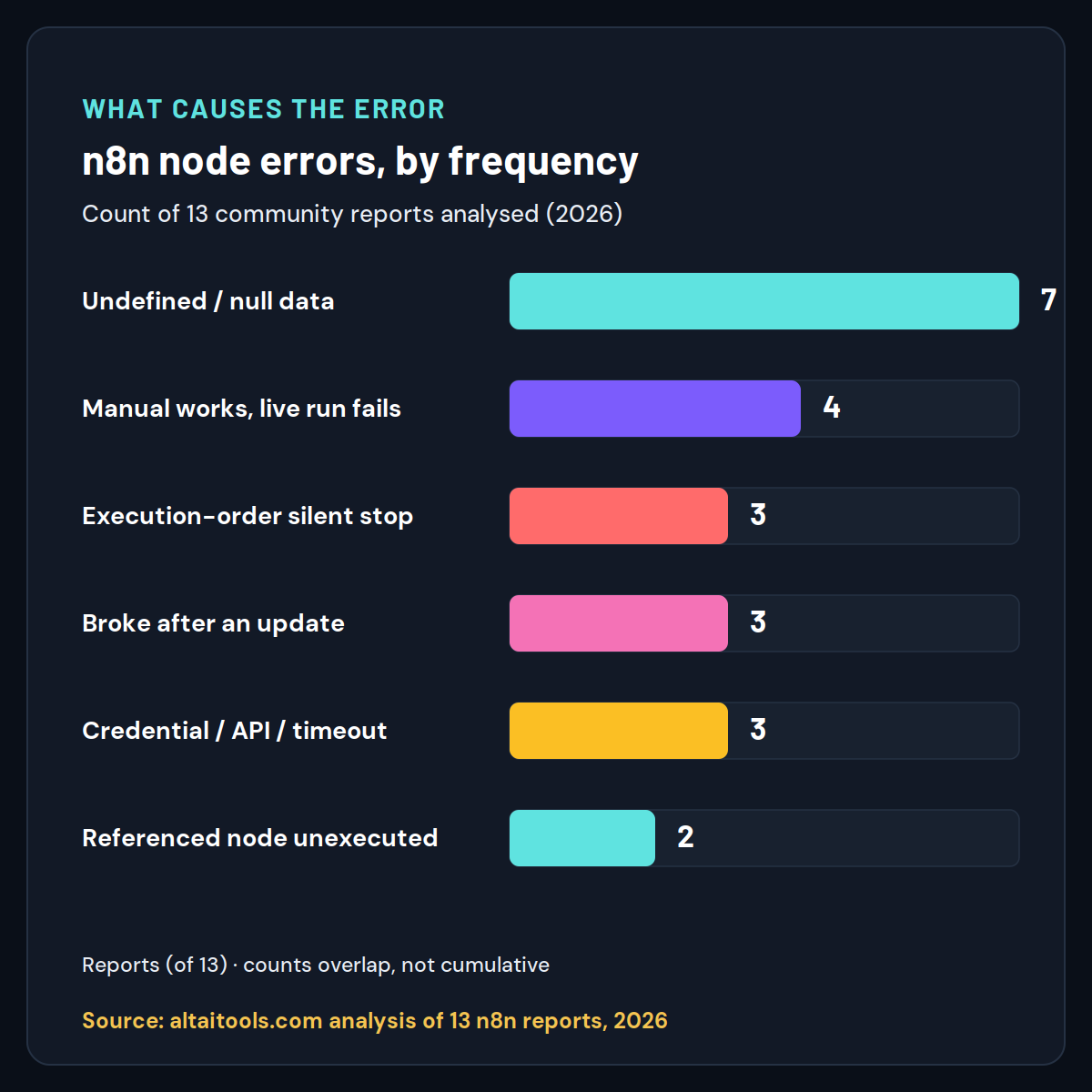
Chart data (Part 3 draws): undefined/null data = 7; manual-works/live-fails = 4; execution-order branch kill = 3; broke after update = 3; credential/API/HTTP = 3; referenced node unexecuted = 2. Counts overlap; not cumulative. Source label: “altaitools.com analysis of 13 n8n community reports & GitHub issues, 2026.”
If you’d rather jump straight to the likely fix, use the diagnostic below: tell it what the error message says and whether it fails in testing, and it points you to the most probable cause and the exact step to apply. Work through the full map underneath if the quick answer doesn’t stick.
n8n Node-Error Diagnostic
1. What does the error message (in the node’s Output tab) mention?
The diagnostic is a shortcut; the sections that follow are the full reasoning behind each answer it gives, starting with proof that these fixes actually work.
We reproduced “this node threw an error during execution” (so these fixes are tested, not guessed)
Rather than repeat what other guides assert, we reproduced the underlying failure in a real Node.js environment using n8n’s own data model (items as [{ json: {...} }]) and n8n 2.38.7’s documented behavior.
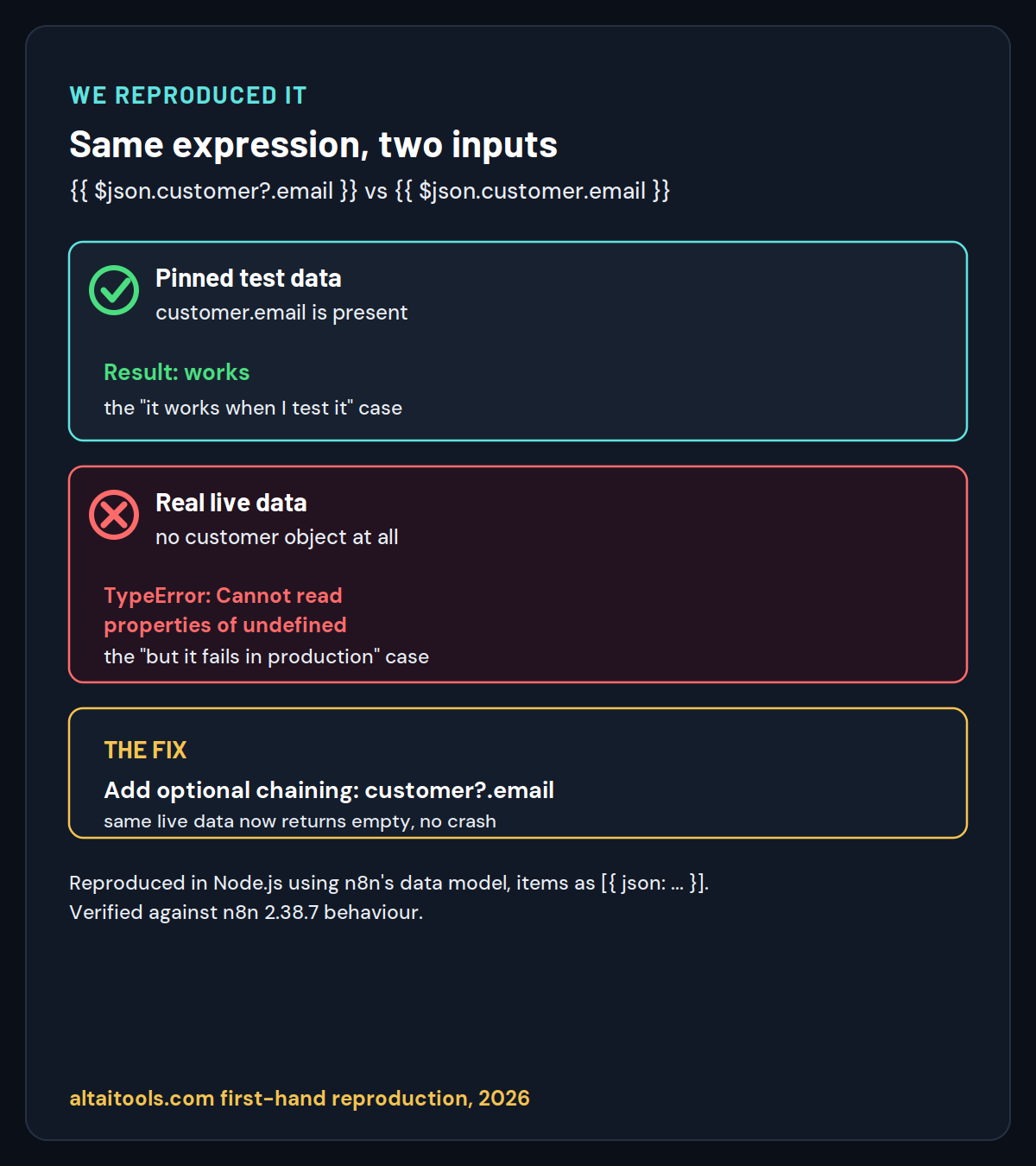
Here is the exact thing that trips people up. The same expression - {{ $json.customer.email }} - succeeds on the tidy data you pin while testing, then throws on the real data a live trigger delivers:
That TypeError is the error n8n shows you as “this node threw an error during execution.” When we changed the expression to use optional chaining, the same live data stopped throwing:
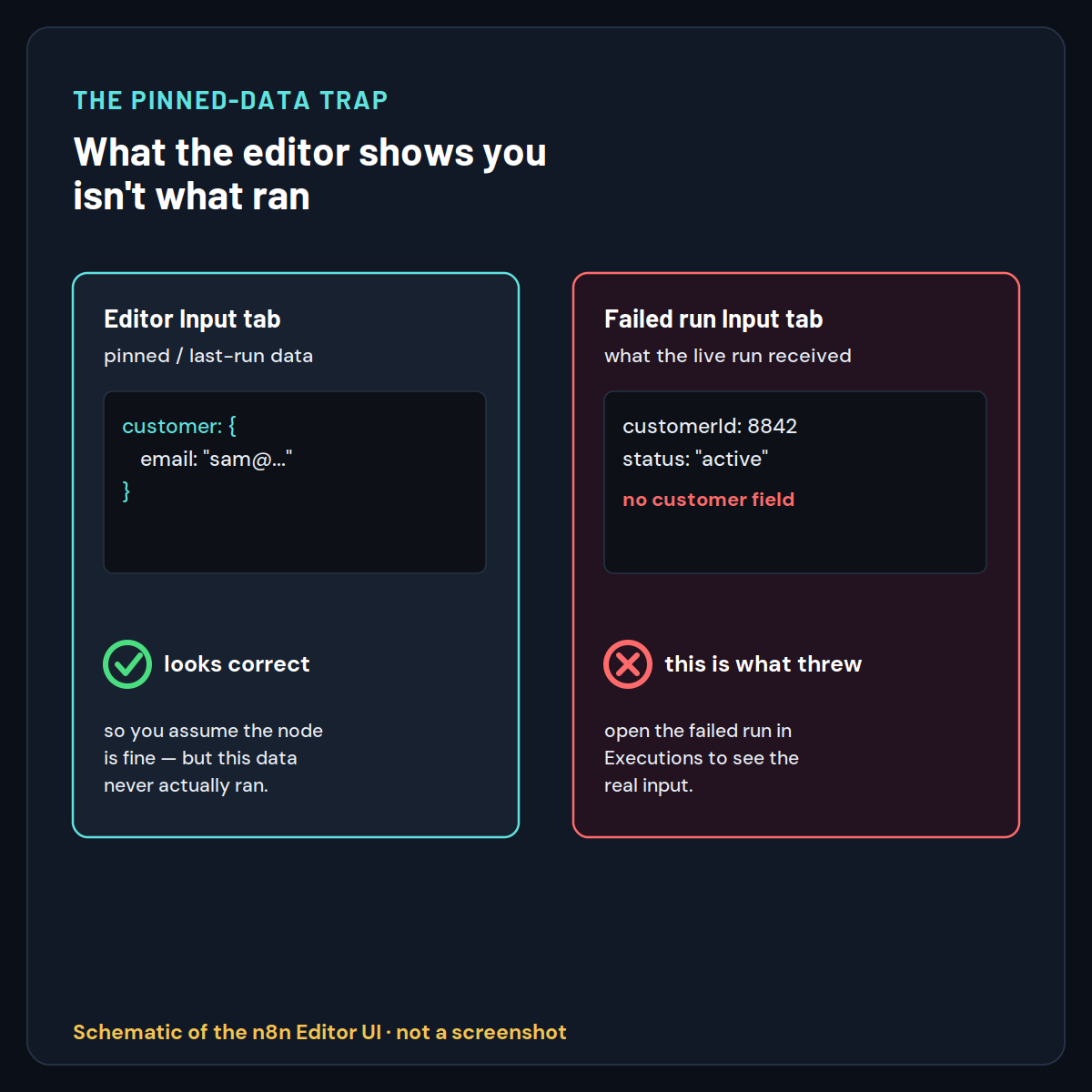
We also confirmed the four Code-node return-shape failures from n8n’s official docs - returning undefined, returning a bare object instead of an array, omitting the json key, or setting json to an array all throw, while [{ json: { ... } }] passes. The friction point worth flagging: the editor’s input panel shows pinned or last-run data, so it can look perfectly correct while the live run received something else entirely. That mismatch is the trap, and it’s why the first real move is always to read the actual execution input, not the editor panel.
Optional: you can also add a real screenshot of the live n8n banner here if you capture one - see the note at the top of this file.
Find the failing node in 3 moves (the Run → Read → Reach triage)
Before jumping to a specific fix, run this three-move triage. It’s the backbone of everything below, and on its own it solves most cases because the answer is usually sitting in the node’s real input data.
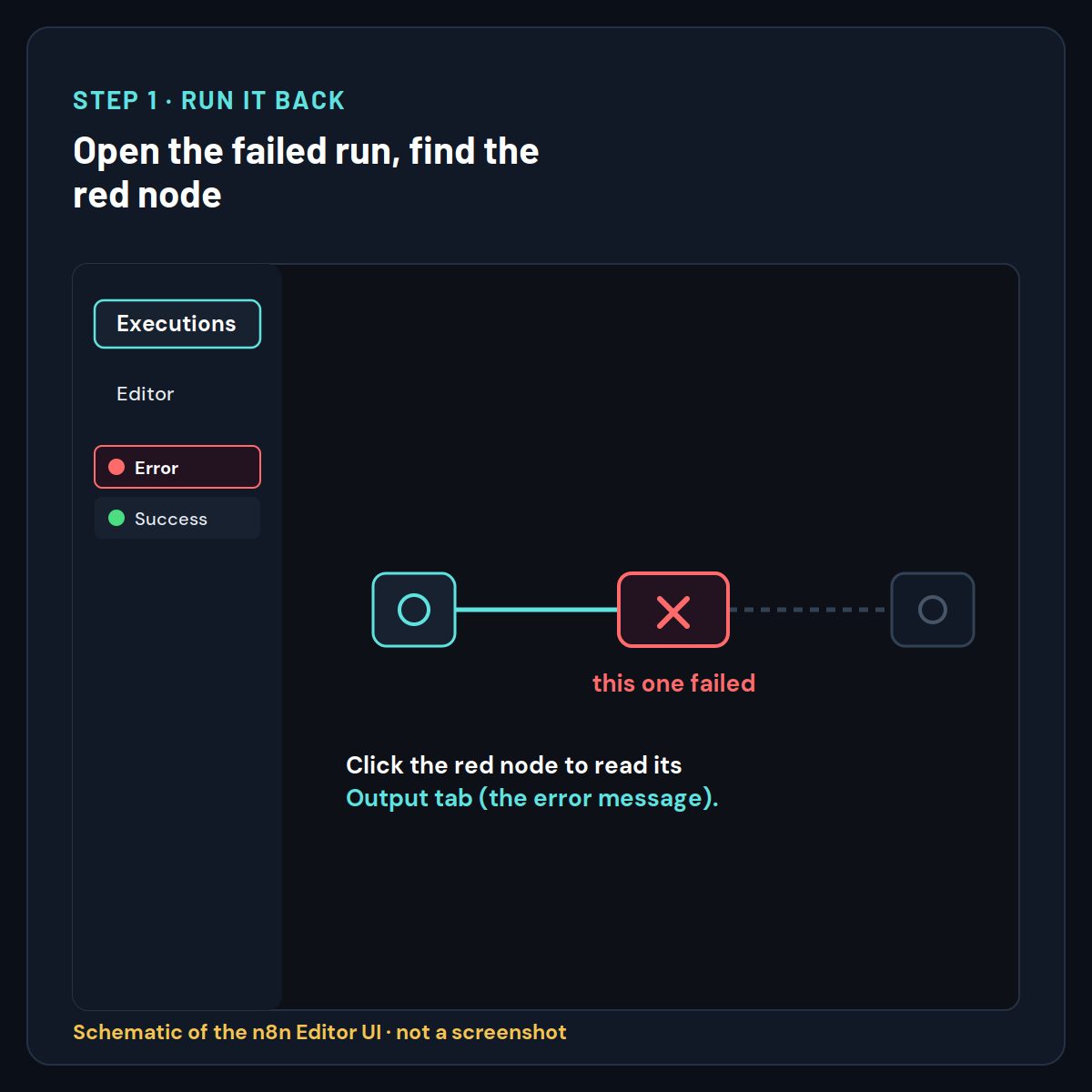
- Run it back. Open the Executions tab in the top menu of the workflow editor (or on the Overview page for all workflows), then click the specific failed run (marked “Error”). This shows the workflow exactly as it ran, with the failing node highlighted in red - not the editor’s optimistic view.
- Read both tabs. Click the red node. Open the Output tab to read the exact error message, then open the Input tab to see the actual data the node received on that run. This is the step that exposes “the input looks fine” lies.
- Reach the cause. Match the error text and the real input to the likelihood-ordered map below, apply the fix, and re-run.
If you don’t see the failed run in Executions: on self-hosted n8n, check that EXECUTIONS_DATA_SAVE_ON_ERROR is not set to none (the default is all), otherwise failed executions aren’t stored for inspection. If the workflow will not run at all, check the “workflow is not active” error instead.
Now work through the fixes in order. They’re ranked by how often each is actually behind this banner, so start at Fix 1.
Fix 1 - Undefined or null data: add optional chaining (most common)
The most likely cause is an expression reading a field that was undefined or null on that run - patch it with optional chaining and a fallback. This is where roughly half of these errors come from, so check it first. The tell in the Output tab is a message like Cannot read properties of undefined (reading 'X') or Cannot read property 'X' of null.
Open the red node’s Input tab and find the field your expression reads. If it’s missing or nested differently than you assumed, rewrite the expression to fail soft:
// Before  -  throws if customer is missing
Before:  {{ $json.customer.email }}

// After  -  optional chaining returns undefined instead of throwing
After:   {{ $json.customer?.email }}

// With a fallback value
Fallback: {{ $json.customer?.email ?? 'no-email' }}
The ?. (optional chaining) operator returns undefined instead of throwing when customer is missing, and ?? supplies a default so downstream nodes still get a usable value. If the field is genuinely required, the real fix is upstream: make the node before this one actually produce customer, and confirm it in that node’s Output tab.
n8n “Cannot read properties of undefined (reading ‘x’)” fix
This exact message means the object to the left of the dot was undefined when read. Optional chaining on that segment ({{ $json.a?.b?.c }}) stops the throw; then decide whether an empty value is acceptable or whether you need to guard the whole branch with an IF node so items without the field never reach this node.
n8n wrong data type (string vs number) causing a node error
A subtler version: the field exists but arrives as the wrong type - a price as "29.99" (string) where a later step does math, for example. Add a Set / Edit Fields (Set) node before the failing node to coerce the type, or handle it in the expression. The Input tab shows the real type; trust it over your assumption.
Fix 2 - It works in manual testing but fails live: stop trusting pinned data
If the node passes when you test it by hand but fails on a live, triggered, or scheduled run, the problem is that manual runs use pinned or simplified data while the live run received a different shape. This is the single most baffling case, and it isn’t a bug - it’s how n8n’s editor works.
When you press Execute Workflow or Execute step with pinned data, every node already has clean data sitting on it. A real trigger (Webhook, Schedule Trigger) delivers whatever the source actually sends, which may have missing fields, nulls, empty arrays, or extra nesting. The editor’s Input panel keeps showing the pinned/last-run data, so it looks correct while the live run quietly failed on something else.
The fix is procedural, not a code change: open the failed live run in the Executions tab (not the editor) and read the Input tab there. Once you see the real data, you’re almost always back at Fix 1. To reproduce a live failure on demand, Pin data that matches the problematic live payload, then run the node so you can iterate on the fix with the exact input that broke it.
n8n node fails only in production / when triggered / on schedule
Same root cause: production data ≠ test data. Before trusting a workflow in production, run it once against a real payload and inspect each node’s actual input. A quick guard is to add an IF node early that drops or routes items missing the fields your workflow depends on, so one malformed record can’t take down the run.
Fix 3 - One node’s error silently stops the rest: check execution order
If some downstream nodes show no output, no error, and don’t even appear in the execution log, they didn’t fail - they never ran, because an earlier node in that branch errored and stopped it. n8n runs one branch to completion before starting the next, and by default a node error halts that branch.
According to n8n’s documentation on execution order, this default behavior means a single failed node can leave the back half of a workflow looking mysteriously empty. Don’t chase the silent nodes - find the one node that’s actually red in the Executions view and fix that. In one solved n8n Community case, three nodes appeared to “do nothing” only because a Gmail node upstream had errored and stopped the branch; fixing the Gmail node brought everything back.
n8n nodes downstream don’t run / show no output / no trace
The absence of a trace is the clue: a node that never executed produces no log entry. Trace back to the last node that did run and produce output - the failure is at the node immediately after it. If instead a node ran but received an empty array, note that n8n skips a node fed an empty input rather than erroring, which is a different symptom (nothing runs, but nothing is red either). And if the workflow never started at all - n8n blocked it before the first node - that’s the separate n8n “workflow has issues and cannot be executed” validation error, which is fixed differently.
Fix 4 - It broke after an n8n update: check what changed
If a node that worked for months suddenly throws this error right after an n8n version bump, a change in that node’s behavior or a stricter data check is the likely cause. Post-update regressions on previously-fine Code nodes and expressions show up repeatedly in n8n’s GitHub issues.
Read the Output tab error, then check that node type’s recent changelog or known issues for your version. As a fast confirmation, note your version (bottom of the n8n UI) and whether the error started exactly at the upgrade. A defensive rewrite - optional chaining, explicit type handling - usually survives the update; brittle expressions that assumed a data shape are what tend to break.
Fix 5 - Credential, rate-limit, or timeout errors on API nodes
If the failing node is an HTTP Request node or a service integration and the error mentions 401, 403, 429, or a timeout, it’s an API-side failure, not a data problem. Match the message to the fix:
401 Unauthorized/403/ “invalid credentials”: re-authenticate the credential in Settings → Credentials, or create a fresh one and reselect it on the node. Note that Code nodes cannot access credentials by design - use the HTTP Request node for authenticated calls. If the failing node is an AI model connection during setup rather than a workflow run, see our fix for when n8n says “the service couldn’t complete the test”.429 Too Many Requests/ rate limit: slow the workflow down. Add a Wait node between calls, use Loop Over Items (Split in Batches), or lower the trigger frequency.ETIMEDOUT/ “socket hang up” / timeout: raise the node’s timeout in its options, check the third-party service’s status, and reduce an oversized request payload.
n8n HTTP Request node error during execution (4xx/5xx)
Read the response body in the Output tab - the API usually says exactly what’s wrong (missing header, bad parameter, expired token). A 4xx is your request; a 5xx is their server. For flaky endpoints, enable retries on the node so a transient 5xx doesn’t fail the whole run.
Fix 6 - “Referenced node is unexecuted”: handle skipped branches
If the error reads “Referenced node is unexecuted” or “an expression references a node that hasn’t executed,” an expression is pulling data from a node that didn’t run on this path - usually a skipped IF or Switch branch. This one competitors rarely cover, but it’s a clean fix.
When an IF or Switch node sends items down one branch, the other branch’s nodes never execute. If a later node (often a Merge or Set) references a node on the un-taken branch, that reference is empty and throws. Fix it by referencing data that always exists on the active path, using a Merge node to bring branches together before you read across them, or guarding the expression so it tolerates the missing node.
Make it fail gracefully so one node can’t kill the workflow
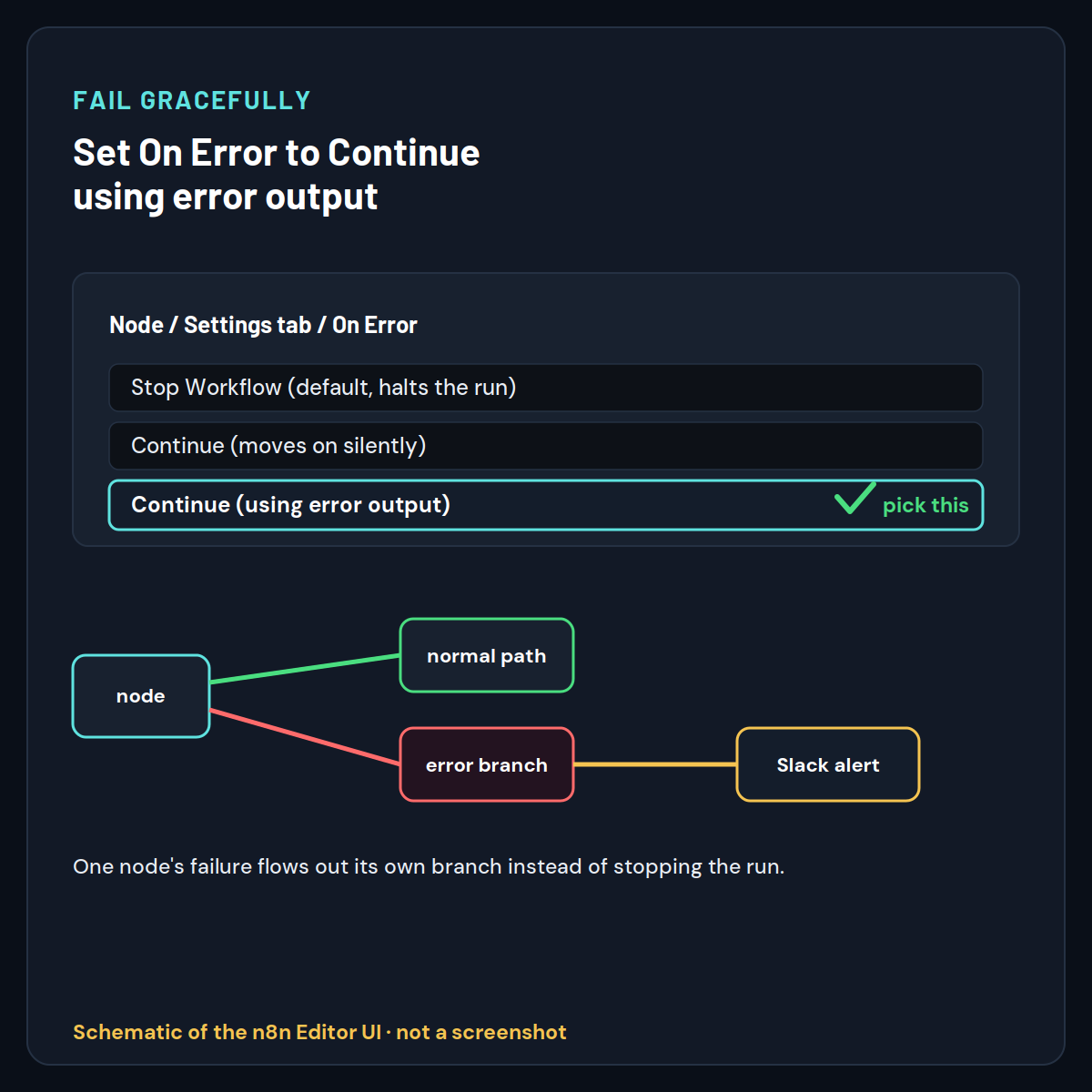
Once you’ve fixed the immediate error, stop the next one from taking down the whole run. Open the node’s Settings tab and set On Error to “Continue (using error output),” which routes a failure to a separate error output instead of halting the branch.
This is the setting that resolved the flagship community case: instead of a silent stop, the failure flows out of a second connector you can wire to a Slack or email alert. The difference between the options matters - Continue moves on using the last valid data with no signal anything went wrong, while Continue (using error output) gives you a real error branch to act on. For workflow-wide coverage, build a separate workflow starting with an Error Trigger node and connect it to a notification node; it fires whenever any workflow in your instance errors, so you learn about failures immediately instead of hours later.
On self-hosted n8n, when the UI still doesn’t tell you enough, set N8N_LOG_LEVEL=debug temporarily to see HTTP requests, credential lookups, and expression evaluation in the server logs - then switch it back to info afterward, since debug logs can expose sensitive data.
Still not working?
If you’ve read the real input, patched the data, and the same node still errors, capture the exact message from the Output tab and search the n8n Community forum for that string - the specific wording almost always leads to a matching thread. If affected nodes genuinely don’t appear in the execution trace at all and nothing you change helps, that’s the tell for a platform-level issue: on n8n Cloud, contact n8n support and mention that the affected nodes never show in the trace, since they can pull server-side logs you can’t see. And once your workflow is running reliably, it’s worth sanity-checking whether n8n is still the right engine for the job - our breakdown of n8n versus Node-RED for workflow automation covers where each one pulls ahead.
Common mistakes that waste time on this error
A few things people try that, per the community threads, reliably don’t fix a runtime node error - so you can skip them:
- Clearing cookies, using incognito, or hard-refreshing the browser. These address editor glitches, not a node that threw on real data. Reported tried, didn’t help.
- Duplicating the whole workflow. A copy inherits the same expressions and hits the same data, so it fails identically.
- Assuming it’s an n8n bug. Occasionally it is, but in the cases we reviewed the error was almost always real: undefined data, a genuine API failure, or execution order. Rule those out before blaming the platform.
- Trusting the editor’s Input panel. It shows pinned or last-run data. Only the failed run in the Executions tab shows what actually broke.
If you’re weighing n8n against visual-builder alternatives while you’re in here, our n8n vs Flowise vs Langflow comparison lays out the trade-offs for AI-heavy workflows.
Frequently asked questions
How do I retry a failed execution in n8n?
Open the Executions tab, click the failed execution, and use the Retry button to re-run it with the same input data from the original run. Retry only helps for transient issues like a brief timeout; if the cause is bad data or a broken expression, fix that first or it fails again.
Can I fix this without writing any code?
Yes. The most common fix is editing one expression to add ?. (a single character change), and the graceful-failure fix is a dropdown - set On Error to “Continue (using error output)” in the node’s Settings tab. Neither requires the Code node or JavaScript knowledge.
How do I stop one broken node from killing the whole workflow?
Open the node’s Settings tab and set On Error to “Continue (using error output),” then wire the new error output to a notification or fallback path. This keeps the rest of the workflow running and gives you a signal when that node fails, instead of a silent stop.
Does this error mean my n8n is broken?
Almost never. In the reports we reviewed, the cause was a real data or configuration problem in a specific node, not the n8n platform. Rule out undefined data, credential issues, and execution order before treating it as a bug or contacting support.
Why did this start right after I updated n8n?
Some updates tighten data handling or change a node’s behavior, so an expression that quietly relied on a loose data shape can start throwing. Check the changed node against your version’s changelog, and rewrite the expression defensively with optional chaining so it survives future updates.
What’s the difference between “Continue” and “Continue (using error output)”?
“Continue” moves past the failure using the last valid data and gives no signal anything went wrong, which can hide problems. “Continue (using error output)” routes the failure down a separate error connector so you can catch it, alert on it, or handle it - the safer choice when you want visibility.
Do I need self-hosted n8n to enable debug logging?
Yes. N8N_LOG_LEVEL=debug and EXECUTIONS_DATA_SAVE_ON_ERROR=all are server environment variables, so they apply to self-hosted and Docker instances. On n8n Cloud you can’t set them; instead, rely on the Executions tab and, for deeper logs, n8n support.
Why can’t my Code node read a credential?
By design, Code nodes have no access to n8n’s credential system, so calling this.getCredentials() errors. Make authenticated API calls with the HTTP Request node instead, or select credentials dynamically on that node using an expression.
What does “Referenced node is unexecuted” mean?
An expression is reading from a node that didn’t run on the current path - typically a node on the un-taken side of an IF or Switch branch. Reference a node that always executes on the active path, or use a Merge node to combine branches before reading across them.
My Code node says “import/export may only appear at the top level” - why?
n8n’s Code node sandbox doesn’t support ES module import/export syntax. Load modules with require() instead. On n8n Cloud, external modules aren’t available at all; module imports only work on self-hosted with the right environment variables set.
Why does my node error only sometimes / intermittently?
Intermittent runtime errors usually mean the incoming data varies - some records have the field your expression reads and some don’t, so only the incomplete ones throw. They can also signal rate limits or timeouts that appear under load. Inspect several failed runs’ inputs to find the common gap.
My Code node says “Cannot find module” - how do I fix it?
This only happens on self-hosted n8n, because n8n Cloud doesn’t allow external modules at all. On self-hosted, install the module in the same environment as n8n and set the NODE_FUNCTION_ALLOW_EXTERNAL environment variable to permit it; with Docker you must extend the image to include the module.
What does “Execution stopped at this node” mean?
That message usually means n8n ran out of memory while processing that node, most often on self-hosted instances handling large payloads or big binary files. Reduce the data volume, process items in smaller batches with Loop Over Items, or raise the memory available to your n8n instance.
Why does my AI Agent node throw an error during execution?
AI Agent and LangChain nodes commonly throw when a required sub-input is undefined - a missing prompt field, an unconnected chat model, or an expression reading executionId or text before it exists. Check that every required sub-node is connected and that the prompt references a field that is actually present.
How do I bypass or disable a node that keeps erroring?
Right-click the node and choose Deactivate to make n8n skip it, or set its On Error to Continue so the run proceeds past it. Deactivating is best while you debug; for production, prefer Continue (using error output) so the failure is handled rather than silently ignored.
Does the error behave differently on n8n Cloud versus Docker?
The banner and the data-related causes are the same on both. The difference is the fixes you can reach: environment-variable fixes like debug logging, saving execution data on error, and installing Code-node modules are self-hosted and Docker only. On Cloud you rely on the Executions tab and n8n support.
Should I use an IF node or optional chaining to prevent this?
Use optional chaining when you just need one expression to tolerate a missing field, and an IF node when whole items lack the data and shouldn’t reach the node at all. For messy inputs, combine them: filter out incomplete items early with IF, then keep expressions defensive with ?. as a safety net.
How do I read the real error text instead of the generic banner?
Open the failed run in the Executions tab, click the red node, and read its Output tab - the specific message (for example Cannot read properties of undefined) sits there, beneath the generic banner. That exact string is what you search or match to a fix; the banner alone never tells you enough.
Can a Merge node cause this error?
Yes. A Merge node throws when it references an input branch that didn’t execute - common when an upstream IF or Switch sent all items down the other path. Make sure both inputs the Merge expects actually produce data on the active run, or restructure so the merge only reads branches that always execute.