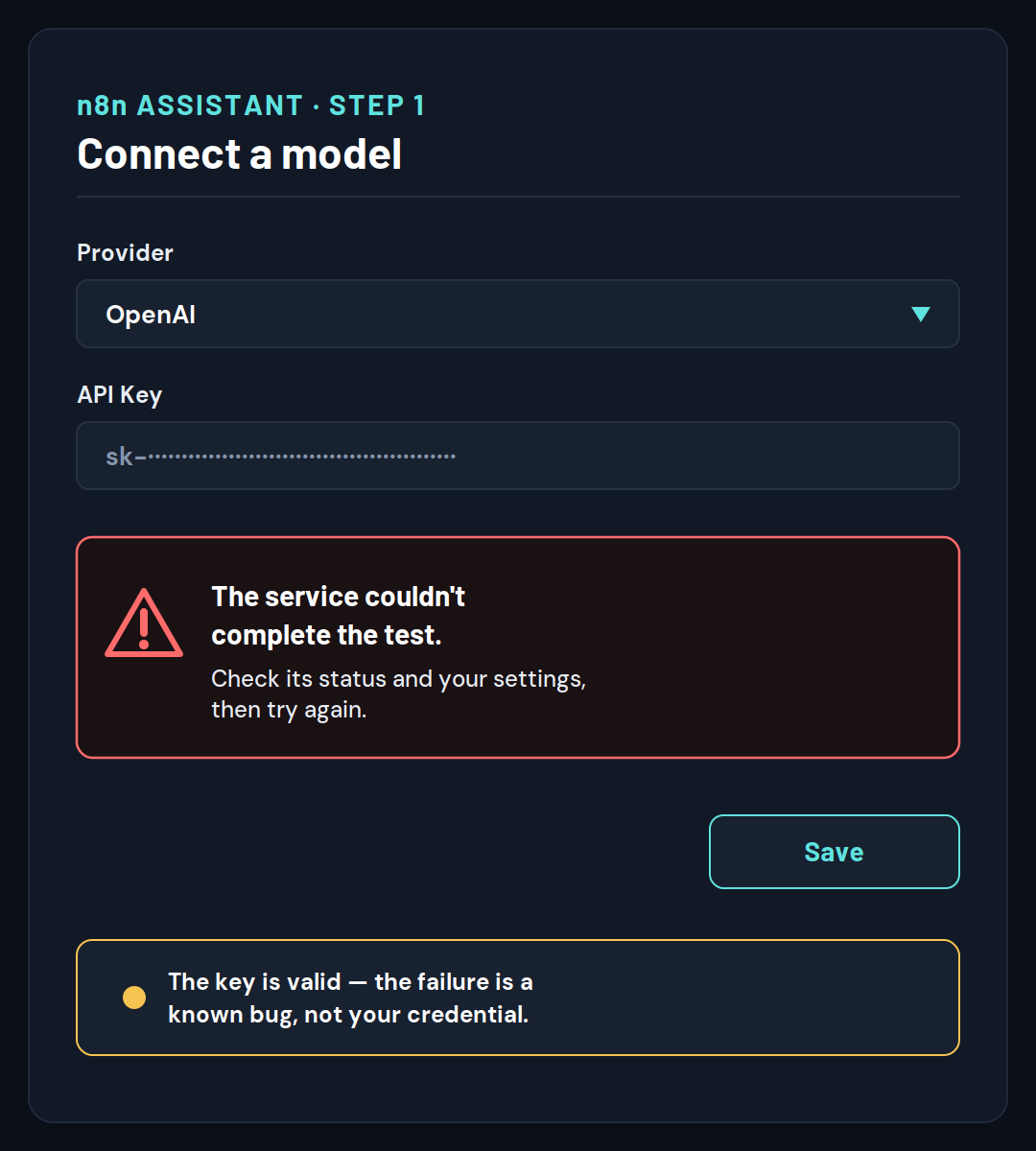
If you’re setting up the n8n Assistant and picked OpenAI, “the service couldn’t complete the test. Check its status and your settings” is almost certainly a known n8n bug - not a problem with your API key - and the fastest fix is to switch the provider to Anthropic, or point n8n at an OpenAI-compatible endpoint so it stops using the API path that’s broken. Your key is fine. The test that failed is a tiny internal check n8n fires before it saves your model, and on OpenAI that check is currently guaranteed to fail.
You’ve probably already regenerated the key, tried a different model, and re-pasted everything twice - and it still throws the same line at step 1, “Connect a model.” That’s the maddening part: the message tells you to “check your settings,” but your settings are correct, so there’s nothing obvious to change. This page gets you past it in about two minutes, and then explains exactly why it happens so you can pick the setup that won’t break again.
This applies to self-hosted n8n (Community, Registered Community, or Business editions) running the n8n Assistant - the instance-ai module - on n8n 2.35 (the version the bug reports cover; n8n 2.43 was released on 6 October 2026 and has not been re-tested here), verified as of September 2026. It is specific to the OpenAI provider. If you’re on n8n Cloud, you won’t hit this, because Cloud manages the model for you.
Quick answer: the fastest fix
Switch your n8n Assistant model provider away from bare OpenAI - either use Anthropic (the default) or route OpenAI through a custom base URL - and the test passes. The verification test n8n runs against OpenAI asks for a response of only 8 tokens, and OpenAI’s newer Responses API rejects any request under 16 tokens. That rejection is what surfaces as the generic “the service couldn’t complete the test” message. Nothing you do to your API key can fix a request-size problem, which is why re-pasting the key never works.
The three fastest paths, in order:
- Use Anthropic instead. Set your model to
anthropic/claude-opus-4-8(the default) with an Anthropic API key. Anthropic has no token minimum, so the test passes immediately. - Keep OpenAI but add a base URL. Set
N8N_INSTANCE_AI_MODEL_URLto an OpenAI-compatible endpoint. This forces n8n onto OpenAI’s older Chat Completions API, which has no token floor. - Use OpenRouter. Point n8n at OpenRouter (which also routes through a base URL) and reach OpenAI models that way.
The Probe Test: what’s really going on
When you save a model in the n8n Assistant, n8n doesn’t just store your key - it fires a tiny “probe” request at the provider to confirm the model actually answers. “The service couldn’t complete the test” means that probe failed. The probe fails for one of three reasons, and they’re ordered below from most common to least, so you spend your time where the fix usually is. We’re calling this the Probe Test - three checks in order of likelihood.
The reason the first check matters so much comes straight from the reports themselves. Across the 5 first-hand developer reports of this exact failure we reviewed (as of September 2026), the cause was the same in every single one - 5 of 5: a verification probe sending fewer output tokens than OpenAI’s API will accept. Not one traced to an actually-invalid API key. These are developer bug reports, which self-select toward the clean, reproducible root cause rather than every confused first-timer - but the pattern is unusually consistent, and it’s why Probe Check 1 comes first.
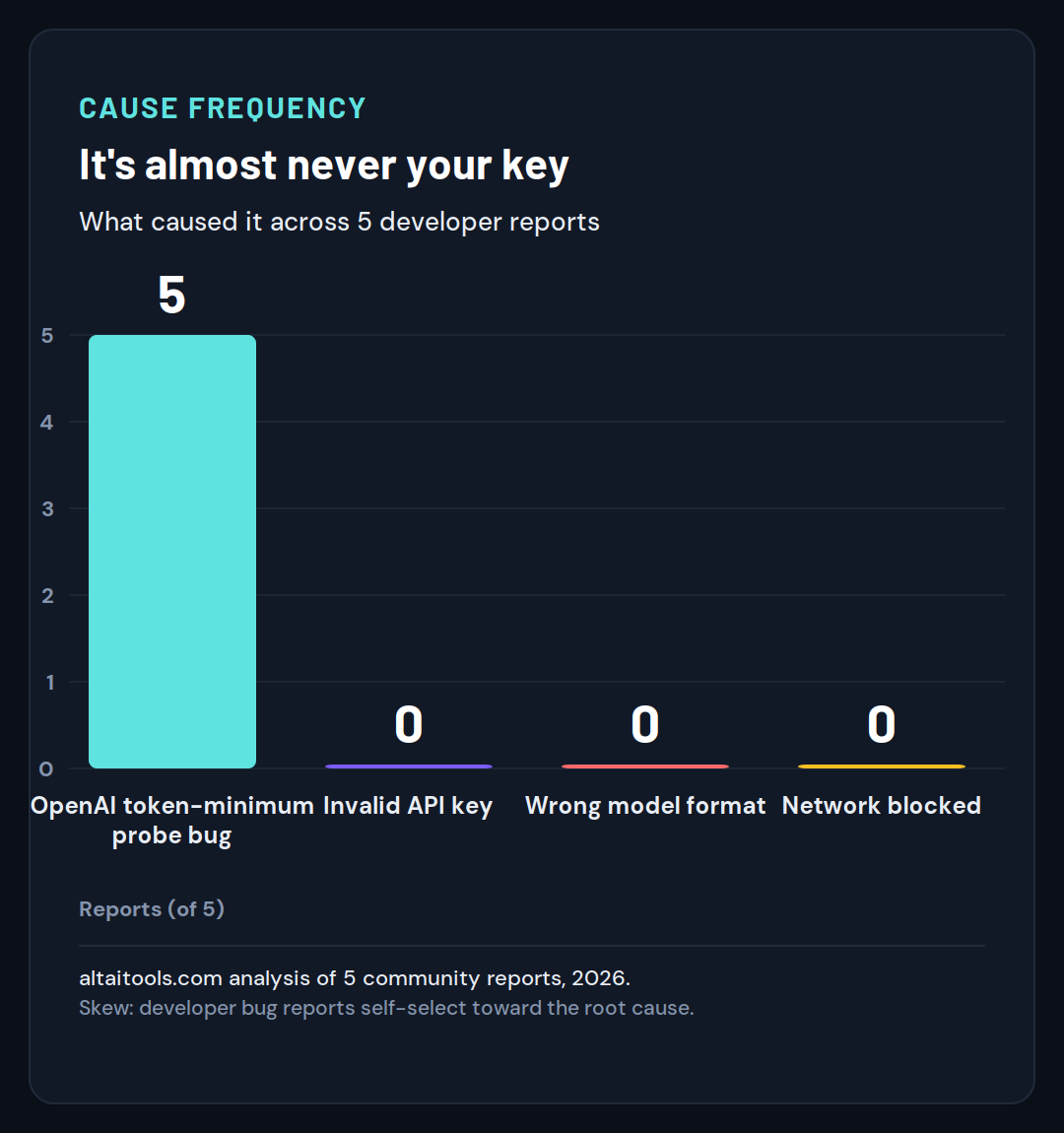
That single dominant bar is why the diagnostic below leads with the OpenAI check rather than the usual “verify your credentials” advice. To make the three checks easy to run in order, here’s the whole Probe Test as a decision flow: start at the failed test, answer whether you picked OpenAI, and follow the branch to your fix - with a final step for reading the real error if all three checks come up empty.
The probe test
Diagnose it in 3 checks
| Step | Ask | Do this | Otherwise |
|---|---|---|---|
| Check 1: The 8-vs-16 bug | Did you pick OpenAI? | Yes: switch provider, or set a base URL. | No: continue to check 2. |
| Check 2: Wrong credential | Using another provider? | Fix the key and the provider/model format. | Still failing? Go to check 3. |
| Check 3: The blocked road | Server can’t reach the provider | Clear firewall / DNS. | Unmask the real error: turn on debug logs and read the hidden 400. |
altaitools.com · verified procedure, September 2026.
Probe Check 1 - The 8-vs-16 bug (almost always this, if you picked OpenAI)
If you selected OpenAI, this error is a known n8n bug and your API key is fine - fix it by using Anthropic, OpenRouter, or a custom OpenAI base URL instead of bare OpenAI. This is the cause in the overwhelming majority of cases, so try it first before touching anything else.
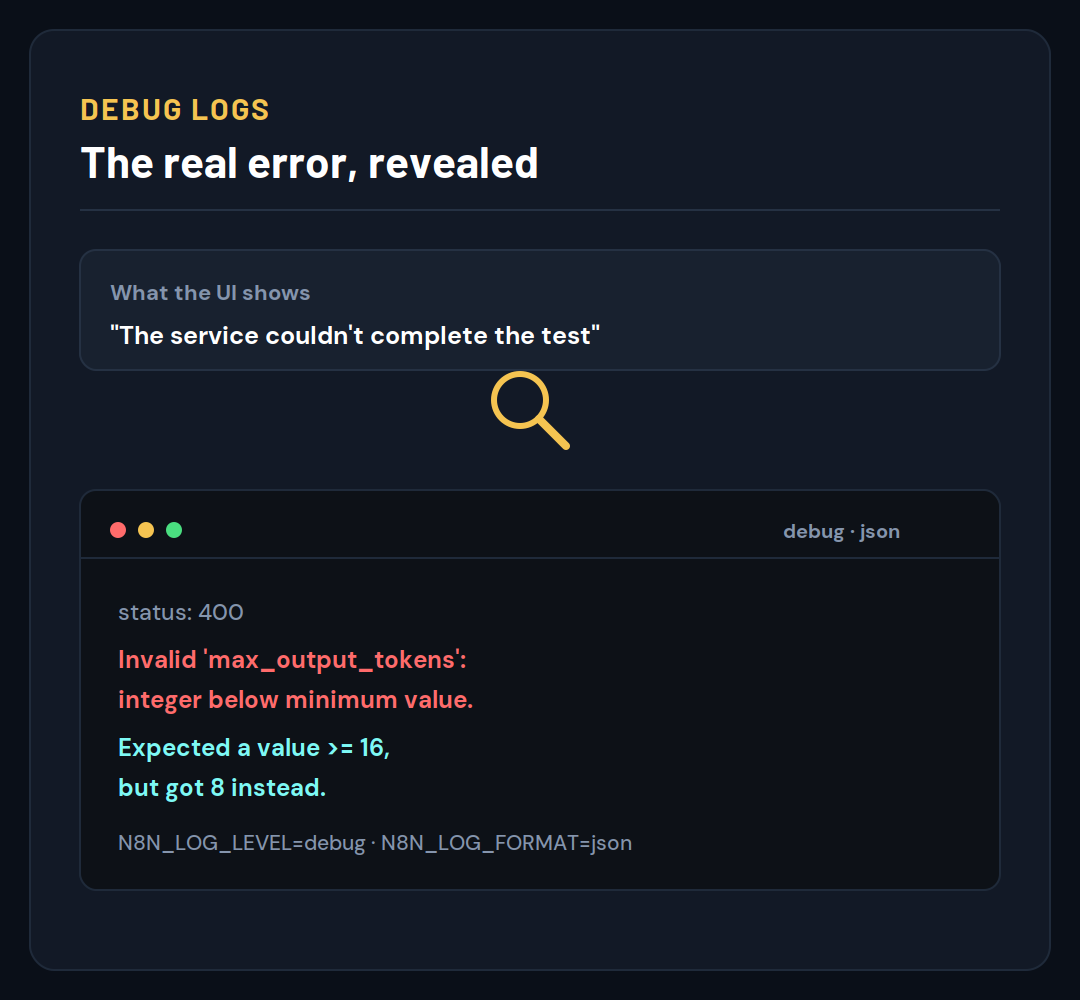
Here’s what’s happening underneath. n8n’s model-verification code sends a fixed request asking OpenAI for a maximum of 8 output tokens. When no custom base URL is set - exactly what the setup wizard produces - n8n talks to OpenAI’s Responses API, and that API rejects any request whose max_output_tokens is below 16. OpenAI returns a 400 error reading Invalid 'max_output_tokens': integer below minimum value. Expected a value >= 16, but got 8 instead. n8n then classifies that 400 as a generic provider_error and shows you only the vague “the service couldn’t complete the test” line - the real reason stays hidden. According to the n8n issue that documented this (#36093), Anthropic enforces no such minimum, which is why the Anthropic default has always worked and OpenAI silently doesn’t.
This is the tell that confirms it’s the bug and not you: the failure is completely independent of which OpenAI model you pick and independent of the key itself. The reporter reproduced it with multiple models using a key that worked perfectly everywhere else.
Fix 1a - Switch to Anthropic (fastest)
- Open your
.envfile (or your Docker Compose environment block). - Set the model to Anthropic:
N8N_INSTANCE_AI_MODEL=anthropic/claude-opus-4-8. - Set
N8N_INSTANCE_AI_MODEL_API_KEYto your Anthropic key (it starts withsk-ant-). - Restart n8n.
- Open the editor and confirm the n8n Assistant connects without the error.
If you don’t have an Anthropic key, create one at the Anthropic console - the default model n8n expects is anthropic/claude-opus-4-8, so you don’t need to change the model string, only supply the key.
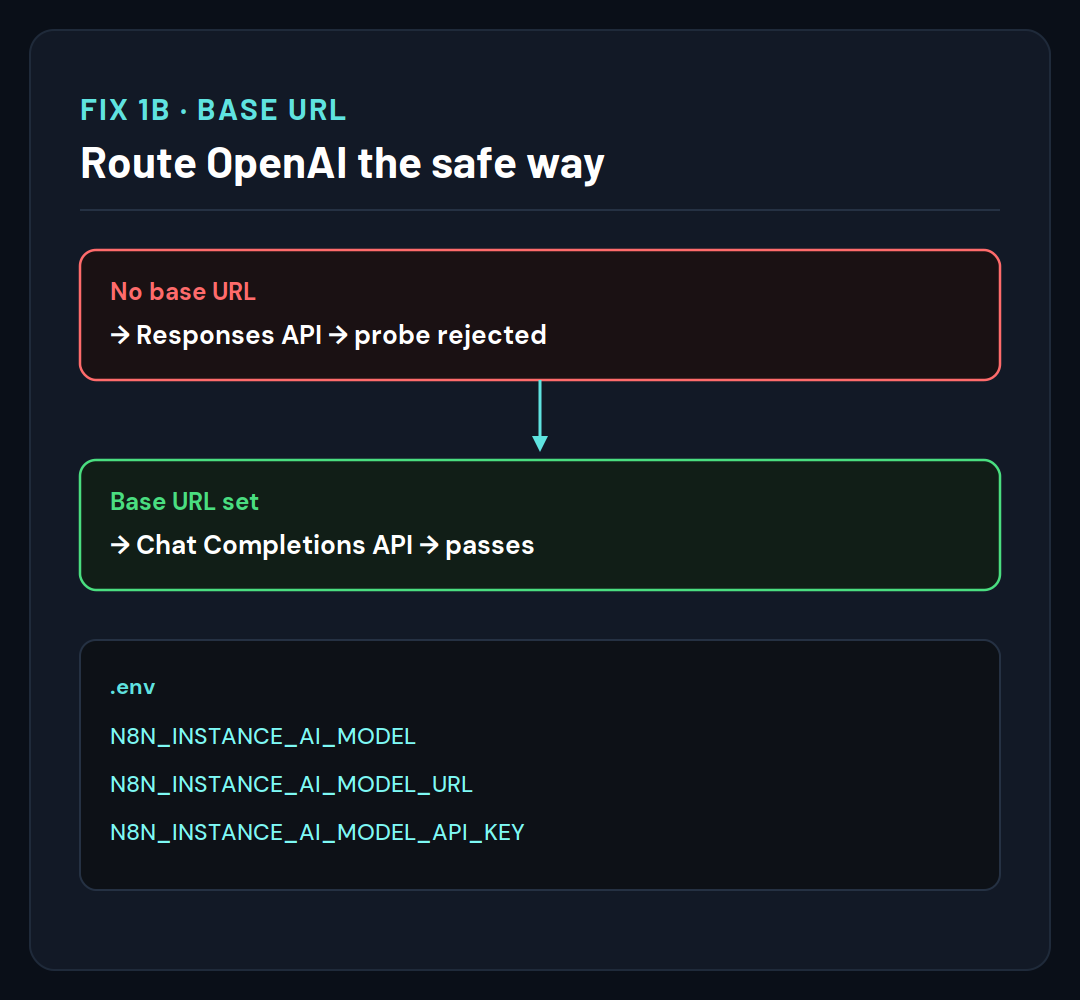
Fix 1b - Keep OpenAI, but add a base URL
If you specifically need OpenAI models, force n8n off the Responses API by giving it a base URL. Setting N8N_INSTANCE_AI_MODEL_URL makes n8n use OpenAI’s Chat Completions API instead, which has no token minimum, so the 8-token probe is accepted.
- Set
N8N_INSTANCE_AI_MODELto your OpenAI model, for exampleopenai/gpt-5.5. - Set
N8N_INSTANCE_AI_MODEL_URLto an OpenAI-compatible endpoint URL. - Set
N8N_INSTANCE_AI_MODEL_API_KEYto your OpenAI key. - Restart n8n and retry the connection.
If you don’t run your own endpoint, this is where an OpenAI-compatible gateway (OpenRouter, LiteLLM, or a local server like Ollama or LM Studio) is useful - any of them gives you a base URL to point at (see our OpenRouter alternatives for how they compare). When you’re weighing whether n8n is even the right long-term home for this kind of automation, our comparison of n8n and Node-RED breaks down where each one fits before you invest more setup time.
Is this fixed in a newer n8n version yet?
Not confirmed as of October 2026. A community fix (PR #36097) that raises the probe budget to 256 tokens had been written but was still open and unmerged as of September 2026, blocked on a contributor agreement, and the release notes for newer versions (up to 2.43, 6 October 2026) do not mention it. That means updating n8n alone may not resolve this yet - the workarounds above are the reliable path today. Re-check the issue status before assuming a plain upgrade fixes it.
Probe Check 2 - The wrong credential (if you’re not on OpenAI, or the key is genuinely off)
If you’re using Anthropic or OpenRouter and still see the error, the probe is failing on the credential itself - check that your key is valid and that your model is written in provider/model format. This is the ordinary cause once the OpenAI bug is ruled out.
n8n selects the model with a provider/model string, and a value in the wrong shape fails verification before it ever reaches the provider. Confirm three things: the key matches the provider you chose, the model string uses the provider/model form, and - if you left N8N_INSTANCE_AI_MODEL_API_KEY unset - that the correct fallback environment variable is present.
- Confirm
N8N_INSTANCE_AI_MODELis written asprovider/model, for exampleanthropic/claude-opus-4-8,openai/gpt-5.5, oropenrouter/deepseek/deepseek-v4-pro. - Confirm the API key belongs to that provider.
- If you didn’t set
N8N_INSTANCE_AI_MODEL_API_KEY, confirm the provider’s fallback variable is set instead:ANTHROPIC_API_KEY,OPENAI_API_KEY, orOPENROUTER_API_KEY. - Restart n8n and retry.
If your key works via curl but fails the n8n test, that mismatch usually points to a format or provider-prefix problem in the model string rather than the key - a common trap when copying a raw model name without its provider/ prefix.
Probe Check 3 - The blocked road (the probe can’t reach the provider)
If the key and format are both correct, the probe may simply be unable to reach the provider from your server - check that your self-hosted box can make outbound calls to the model’s API. This is the least common cause but the easiest to overlook on a locked-down host.
A firewall, corporate proxy, VPN, or broken DNS on the machine running n8n can stop the verification request from ever reaching the provider, and the test fails even though everything in the UI is correct. This shows up more on self-hosted servers behind strict egress rules than on a laptop.
- From inside the n8n container or host, confirm outbound HTTPS works to your provider’s API domain.
- If you use a proxy, confirm n8n is configured to use it for outbound requests.
- Check DNS resolves the provider’s hostname (a DNS failure often surfaces separately as an
EAI_AGAINerror). - Retry the connection once connectivity is confirmed.
This message is only about the model-connection test at setup. If instead a node fails while a workflow is actually running, that’s a different problem - see our fix for “this node threw an error during execution”.
See what the probe actually said (unmask the real error)
Because n8n hides the real provider error behind a generic message, turn on debug logging to read the actual 400 - this converts the vague error into a specific, named one. This is the single step that tells you which Probe Check applies, and almost nobody does it.
On self-hosted n8n, set the log level and format so validation errors print in full, then restart and reproduce the failure.
- Add these to your environment: set
N8N_LOG_LEVELtodebugandN8N_LOG_FORMATtojson. - Restart n8n.
- Repeat the “Connect a model” test so it fails again.
- Read the logs - the real upstream error (for the OpenAI bug, the
Invalid 'max_output_tokens'400) appears in the log metadata.
If the log shows the max_output_tokens rejection, you’ve confirmed Probe Check 1. If it shows an authentication error, you’re on Probe Check 2. If it shows a connection or DNS failure, you’re on Probe Check 3. And if the trouble is that a finished workflow simply won’t run on its own, the cause is usually publishing, not the model - covered in “the workflow is not active and cannot be executed”.
Common mistakes that keep people stuck
The biggest mistake is treating this as a credential problem and burning time on the key, when on OpenAI the key was never the issue. Here’s what sends people down the wrong path:
- Regenerating the OpenAI API key. It feels like the obvious move, but the probe fails on request size, not authentication - a new key hits the exact same wall.
- Trying a different OpenAI model. The failure is independent of the model. Switching from one GPT model to another changes nothing, because every OpenAI model routes through the same Responses API path.
- Assuming an n8n update will fix it. The fix isn’t merged yet, so upgrading alone leaves you stuck. Use a workaround until the patch actually ships.
- Reading “check your settings” literally and hunting for a wrong setting. There often isn’t one - the message is generic because n8n couldn’t classify the underlying
provider_error.
Note that this is a different error from n8n’s “the workflow has issues and cannot be executed” message, which is about a node failing validation inside a workflow, not a model connection test. If your error is about a workflow rather than the “Connect a model” step, that guide is the right one.
How to prevent this going forward
The reliable way to avoid this error is to start the n8n Assistant on Anthropic (the default) and only move to OpenAI once the OpenAI probe bug is patched. If OpenAI is a hard requirement, keep a base URL configured so n8n never falls back to the bare Responses API path. For teams building AI-agent automations where model setup matters, our look at n8n vs Flowise vs Langflow covers how each platform handles model connections.
Once your model connects cleanly, the rest of the n8n Assistant setup - the sandbox and optional web search - works as documented, and you can move on to actually building with it.
Still stuck after all three Probe Checks? Turn on debug logging (above), capture the real 400, and post it to the n8n Community forum with your n8n version, hosting method, and provider - that’s exactly the detail needed to separate the known OpenAI bug from a genuine credential or network issue on your side.
Frequently asked questions
What does “the service couldn’t complete the test” mean in n8n?
It means n8n’s pre-save verification probe - a small test request it sends to your chosen model - failed, so n8n won’t store the connection. It is not a billing or account error. On OpenAI it’s a known n8n bug where the probe requests too few tokens; on other providers it usually points to a key or connectivity problem.
Why does OpenAI fail but Anthropic works in the n8n Assistant?
OpenAI’s Responses API enforces a minimum of 16 output tokens per request, and n8n’s probe asks for only 8, so OpenAI rejects it. Anthropic has no such minimum, so the identical 8-token probe is accepted. That single difference is why the Anthropic default connects and bare OpenAI does not.
Is my API key the problem?
Almost certainly not, if you picked OpenAI. The failure is a request-size mismatch inside n8n’s verification code, not an authentication failure, and it happens with keys that work perfectly in other tools. Regenerating or re-pasting the key won’t help - change the provider or add a base URL instead.
Which n8n editions and setups does this affect?
It affects self-hosted n8n running the instance-ai module - Community, Registered Community, and Business editions. n8n Cloud isn’t affected because Cloud manages the model connection for you. The error appears at step 1, “Connect a model,” of the self-hosted n8n Assistant setup.
Does setting N8N_INSTANCE_AI_MODEL_URL really fix OpenAI?
Yes, indirectly. n8n uses OpenAI’s token-restricted Responses API only when no base URL is set. Supplying N8N_INSTANCE_AI_MODEL_URL routes requests through the Chat Completions API path instead, which imposes no token floor, so the 8-token probe passes. Point it at any OpenAI-compatible endpoint.
Can I use OpenRouter or a local model to get around this?
Yes. OpenRouter and OpenAI-compatible local servers such as Ollama or LM Studio are reached through a base URL, which keeps n8n off the bare Responses API path that triggers the bug. Set N8N_INSTANCE_AI_MODEL_URL to the gateway’s endpoint and supply the matching key, or leave the key blank for local servers that don’t need one.
What is the exact underlying error OpenAI returns?
OpenAI returns an HTTP 400 reading Invalid 'max_output_tokens': integer below minimum value. Expected a value >= 16, but got 8 instead. n8n catches this, labels it a generic provider_error, and shows only “the service couldn’t complete the test,” which is why the real cause stays hidden until you enable debug logging.
Will updating n8n fix this?
Not yet, as of September 2026. The proposed fix raises the probe to 256 tokens but remains an unmerged pull request, so a routine upgrade won’t include it. Until it ships in a stable release, rely on the Anthropic switch or the base-URL workaround rather than waiting for an update.
Why does n8n show such a vague message instead of the real error?
n8n’s failure classifier maps the provider’s HTTP 400 to a broad provider_error category, and the UI prints a single generic line for that category. The specific upstream reason is written only to the debug logs. Enabling N8N_LOG_LEVEL=debug and N8N_LOG_FORMAT=json surfaces the exact provider response.
Does this happen with every OpenAI model?
Yes. Because the failure is caused by the probe’s request size rather than the model, every OpenAI model selected through the standard setup fails identically. Switching between GPT models makes no difference - the shared Responses API path is what carries the token minimum that the probe violates.
I only see the error after choosing a provider in the UI - is the .env method safer?
The environment-variable method is the most reliable way to set the model, key, and base URL, because it applies the exact values n8n reads at startup. If your version’s in-editor AI settings don’t expose a base-URL field, configure N8N_INSTANCE_AI_MODEL_URL through .env or Docker Compose and restart.
Is it safe to run debug logging just to diagnose this?
Yes, temporarily. Debug logging prints more detail - including the real provider error - to your server logs, which is exactly what you need to confirm the cause. Turn it off again afterward so logs don’t fill with verbose output, and avoid sharing raw logs publicly without removing any keys they might contain.
What is the n8n Assistant, and why does it need a model at all?
The n8n Assistant is the built-in AI helper (also called AskAI or AI Builder) that scaffolds and edits workflows for you. On self-hosted n8n it’s the instance-ai module, and it needs its own model connection - separate from any model nodes in your workflows - which is the connection that fails this test at setup.
Do I need a sandbox configured before the model test will pass?
The model test itself checks only the provider connection, so a missing sandbox won’t cause this specific “couldn’t complete the test” message. However, the Assistant as a whole requires N8N_INSTANCE_AI_SANDBOX_ENABLED=true to run, so configure the sandbox as well before expecting the full Assistant to work.
Does this error affect model nodes inside my workflows too?
No. This message is specific to the Assistant’s “Connect a model” setup probe. The OpenAI Chat Model node you drop into a workflow uses a different code path and its own credential test, so a workflow node can succeed even while the Assistant setup fails - and vice versa.